> For the complete documentation index, see [llms.txt](https://guide.cronuszen.com/llms.txt). Markdown versions of documentation pages are available by appending `.md` to page URLs; this page is available as [Markdown](https://guide.cronuszen.com/zen-pt/zen-link/luz-de-status.md).

# Luz de status

A cor indica qual parte está se comunicando, o ritmo indica como está indo.

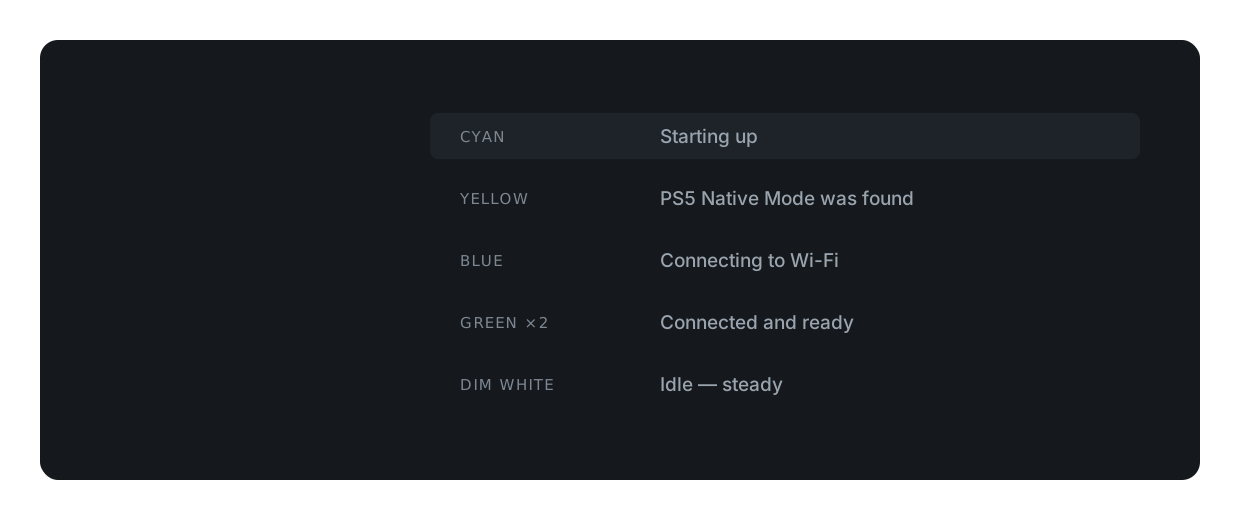
### Inicialização normal

Esta é a sequência completa, da conexão até ficar pronto. Leva alguns segundos.

<figure><img src="https://2555423926-files.gitbook.io/~/files/v0/b/gitbook-x-prod.appspot.com/o/spaces%2Fa1t6RET8gDbZRwSCKi5I%2Fuploads%2FQY1zRl9heeIMBARUEtCB%2Fled-normal-startup%20(2).svg?alt=media&amp;token=af1f85c9-d48e-4b63-95a3-5cc9fc9e0cea" alt=""><figcaption></figcaption></figure>

***

### O vermelho sempre conta

Uma luz vermelha significa que algo falhou. Ela pisca em grupos, pausa e repete. Conte um grupo e depois verifique o ritmo; a mesma contagem significa coisas diferentes em velocidades diferentes.

<figure><img src="https://2555423926-files.gitbook.io/~/files/v0/b/gitbook-x-prod.appspot.com/o/spaces%2Fa1t6RET8gDbZRwSCKi5I%2Fuploads%2FhHhGcaef80FKNv4tkG56%2Fred-short-four-per-group.svg?alt=media&amp;token=41f84e3d-228f-47c0-a11a-101a4160f640" alt=""><figcaption></figcaption></figure>

<figure><img src="https://2555423926-files.gitbook.io/~/files/v0/b/gitbook-x-prod.appspot.com/o/spaces%2Fa1t6RET8gDbZRwSCKi5I%2Fuploads%2FBRXos7htaXFoitqN09E0%2Fred-long-repeats-forever.svg?alt=media&amp;token=91796efb-a501-4100-9000-febe3a652fe0" alt=""><figcaption></figcaption></figure>

***

### Inicializando

<figure><img src="https://2555423926-files.gitbook.io/~/files/v0/b/gitbook-x-prod.appspot.com/o/spaces%2Fa1t6RET8gDbZRwSCKi5I%2Fuploads%2F82ycKLsMm2hCYX9G9RJZ%2Fcyan-steady.svg?alt=media&amp;token=1501caa1-141d-481b-8311-368a96fac578" alt=""><figcaption></figcaption></figure>

<figure><img src="https://2555423926-files.gitbook.io/~/files/v0/b/gitbook-x-prod.appspot.com/o/spaces%2Fa1t6RET8gDbZRwSCKi5I%2Fuploads%2FGURvB1I9E2UNvS0CMsED%2Fyellow-steady-1-second.svg?alt=media&amp;token=7d6a08e5-3f1d-46bb-bf09-3a9ea26dc576" alt=""><figcaption></figcaption></figure>

<figure><img src="https://2555423926-files.gitbook.io/~/files/v0/b/gitbook-x-prod.appspot.com/o/spaces%2Fa1t6RET8gDbZRwSCKi5I%2Fuploads%2FHAfv8Hl19K7Tuq8U06BE%2Fgreen-one-flash.svg?alt=media&amp;token=eba50753-3c2d-41bd-b3db-d1af4c9ad03f" alt=""><figcaption></figcaption></figure>

***

### Wi-Fi

<figure><img src="https://2555423926-files.gitbook.io/~/files/v0/b/gitbook-x-prod.appspot.com/o/spaces%2Fa1t6RET8gDbZRwSCKi5I%2Fuploads%2FpyyWU5oBC4ZTaLxJHIVc%2Fblue-slow-fade.svg?alt=media&amp;token=066e35f9-90d0-4677-8f24-449e36dc27f7" alt=""><figcaption></figcaption></figure>

<figure><img src="https://2555423926-files.gitbook.io/~/files/v0/b/gitbook-x-prod.appspot.com/o/spaces%2Fa1t6RET8gDbZRwSCKi5I%2Fuploads%2FF9fdTCJcS4L3FncD0mkX%2Fblue-blinking-once-a-second.svg?alt=media&amp;token=7bce1a4d-e700-46d6-9af6-1f92d0e6983d" alt=""><figcaption></figcaption></figure>

<figure><img src="https://2555423926-files.gitbook.io/~/files/v0/b/gitbook-x-prod.appspot.com/o/spaces%2Fa1t6RET8gDbZRwSCKi5I%2Fuploads%2FtU9gERvuRwrefSP3VrIq%2Fgreen-two-flashes.svg?alt=media&amp;token=60ebb3e1-d337-481b-a281-3e67b96dec1e" alt=""><figcaption></figcaption></figure>

<figure><img src="https://2555423926-files.gitbook.io/~/files/v0/b/gitbook-x-prod.appspot.com/o/spaces%2Fa1t6RET8gDbZRwSCKi5I%2Fuploads%2FqecuNpkrb35F6qYXy9Am%2Forange-two-flashes.svg?alt=media&amp;token=e01f1cb7-fcf9-4a2a-8ebf-05c5dc8e87ef" alt=""><figcaption></figcaption></figure>

<figure><img src="https://2555423926-files.gitbook.io/~/files/v0/b/gitbook-x-prod.appspot.com/o/spaces%2Fa1t6RET8gDbZRwSCKi5I%2Fuploads%2F1qJPgCMXtbMiQVrFAGRH%2Fdim-white-idle-steady.svg?alt=media&amp;token=c9262a1a-acc2-4b73-864e-a0fa1608769b" alt=""><figcaption></figcaption></figure>

***

### Modo nativo do PS5

Magenta pertence à inicialização do modo Nativo.\
Verde no final significa que o modo Nativo foi bem-sucedido.

<figure><img src="https://2555423926-files.gitbook.io/~/files/v0/b/gitbook-x-prod.appspot.com/o/spaces%2Fa1t6RET8gDbZRwSCKi5I%2Fuploads%2FmQxJA4gNfWxohlgtuABG%2Fmagenta-two-flashes.svg?alt=media&amp;token=f826befb-ea17-4b7f-b561-dfe0b38c21a8" alt=""><figcaption></figcaption></figure>

<figure><img src="https://2555423926-files.gitbook.io/~/files/v0/b/gitbook-x-prod.appspot.com/o/spaces%2Fa1t6RET8gDbZRwSCKi5I%2Fuploads%2FEgav3nsCDiwREuoAlbmN%2Flight-green-two-flashes.svg?alt=media&amp;token=a9140cbe-14f4-42e2-bb52-692c372aa4cb" alt=""><figcaption></figcaption></figure>

<figure><img src="https://2555423926-files.gitbook.io/~/files/v0/b/gitbook-x-prod.appspot.com/o/spaces%2Fa1t6RET8gDbZRwSCKi5I%2Fuploads%2Fzq3DX7w86ysvhybWjvfd%2Fmagenta-slow-fade.svg?alt=media&amp;token=f8d369c8-952c-4396-a09c-740cd14c4cc7" alt=""><figcaption></figcaption></figure>

<figure><img src="https://2555423926-files.gitbook.io/~/files/v0/b/gitbook-x-prod.appspot.com/o/spaces%2Fa1t6RET8gDbZRwSCKi5I%2Fuploads%2FSdkx9u3RvPuzOERiNxnm%2Fmagenta-fast-blinking.svg?alt=media&amp;token=e83c2638-2ca2-4323-890c-0fa1bd313e85" alt=""><figcaption></figcaption></figure>

<figure><img src="https://2555423926-files.gitbook.io/~/files/v0/b/gitbook-x-prod.appspot.com/o/spaces%2Fa1t6RET8gDbZRwSCKi5I%2Fuploads%2FDjqpN5S7YEnHNe7jg6np%2Flight-green-three-flashes.svg?alt=media&amp;token=11a7245f-a960-4e2b-9308-2dd45eff69f3" alt=""><figcaption></figcaption></figure>

***

### Atualizações de firmware

<figure><img src="https://2555423926-files.gitbook.io/~/files/v0/b/gitbook-x-prod.appspot.com/o/spaces%2Fa1t6RET8gDbZRwSCKi5I%2Fuploads%2FuCMTxUyv2OABclSVIqHj%2Fblue-fast-blinking.svg?alt=media&amp;token=68204682-9d71-481a-889a-0a681615734a" alt=""><figcaption></figcaption></figure>

<figure><img src="https://2555423926-files.gitbook.io/~/files/v0/b/gitbook-x-prod.appspot.com/o/spaces%2Fa1t6RET8gDbZRwSCKi5I%2Fuploads%2FlVcBB7bG2lbcffYj7xvn%2Fblue-steady.svg?alt=media&amp;token=9ecd2306-f089-4356-bd05-8fcf61a509df" alt=""><figcaption></figcaption></figure>

<figure><img src="https://2555423926-files.gitbook.io/~/files/v0/b/gitbook-x-prod.appspot.com/o/spaces%2Fa1t6RET8gDbZRwSCKi5I%2Fuploads%2FCsZKaAfmErbJ1qRsNkuD%2Fgreen-steady-then-restart.svg?alt=media&amp;token=eebbaf7b-99e1-47d8-9c57-ccc524c4c97f" alt=""><figcaption></figcaption></figure>

<figure><img src="https://2555423926-files.gitbook.io/~/files/v0/b/gitbook-x-prod.appspot.com/o/spaces%2Fa1t6RET8gDbZRwSCKi5I%2Fuploads%2FpkmchHt6pudCmcblAEMq%2Forange-three-flashes.svg?alt=media&amp;token=1e747250-aa71-4ad7-a13c-7f8cba2ddc3c" alt=""><figcaption></figcaption></figure>

***

### Vermelho: piscadas rápidas

Algo deu errado durante a inicialização do Modo Nativo do PS5. A luz se apaga sozinha após cerca de dez segundos e você pode tentar novamente.

<figure><img src="https://2555423926-files.gitbook.io/~/files/v0/b/gitbook-x-prod.appspot.com/o/spaces%2Fa1t6RET8gDbZRwSCKi5I%2Fuploads%2FQ3lkGH9YUAJdqvNFK7BB%2Fred-2-blinks.svg?alt=media&amp;token=8c65d66c-0409-4b7f-b84d-b774145e9f2a" alt=""><figcaption></figcaption></figure>

<figure><img src="https://2555423926-files.gitbook.io/~/files/v0/b/gitbook-x-prod.appspot.com/o/spaces%2Fa1t6RET8gDbZRwSCKi5I%2Fuploads%2Fzr1GdTB4jC0VgNMO7Djq%2Fred-3-blinks.svg?alt=media&amp;token=1d526937-b445-49eb-89f1-0936ea37a101" alt=""><figcaption></figcaption></figure>

<figure><img src="https://2555423926-files.gitbook.io/~/files/v0/b/gitbook-x-prod.appspot.com/o/spaces%2Fa1t6RET8gDbZRwSCKi5I%2Fuploads%2FbXt0iOYqrCs2NfrYuR0z%2Fred-4-blinks.svg?alt=media&amp;token=bb7b73c5-ca2d-4669-a38d-4fe7f0251d1d" alt=""><figcaption></figcaption></figure>

<figure><img src="https://2555423926-files.gitbook.io/~/files/v0/b/gitbook-x-prod.appspot.com/o/spaces%2Fa1t6RET8gDbZRwSCKi5I%2Fuploads%2FUPIqkHp08vIAiG2505cc%2Fred-5-blinks.svg?alt=media&amp;token=2c0600eb-778a-4246-9b63-3a774d29f4d4" alt=""><figcaption></figcaption></figure>

***

### Vermelho: piscadas longas

O dispositivo parou. Isso nunca se resolve sozinho e sempre precisa de atenção.

<figure><img src="https://2555423926-files.gitbook.io/~/files/v0/b/gitbook-x-prod.appspot.com/o/spaces%2Fa1t6RET8gDbZRwSCKi5I%2Fuploads%2FnW1XrB63oDugIqR63lRH%2Fred-2-long-blinks.svg?alt=media&amp;token=d5a23b25-d3d9-4e22-adab-8f9cd19ee745" alt=""><figcaption></figcaption></figure>

<figure><img src="https://2555423926-files.gitbook.io/~/files/v0/b/gitbook-x-prod.appspot.com/o/spaces%2Fa1t6RET8gDbZRwSCKi5I%2Fuploads%2FR9qY2uyvH1ILGrIIFX8l%2Fred-3-long-blinks.svg?alt=media&amp;token=8ceaefa6-7bd4-4ea0-88cb-cb1146b4a75a" alt=""><figcaption></figcaption></figure>

***

{% hint style="warning" %}
**Nada aqui corresponde?** Se a luz estiver completamente apagada, o dispositivo não está recebendo energia — tente outra porta USB ou outro cabo. Se você vir uma cor ou ritmo que não está nesta página, anote a cor, se ela pisca rápido ou devagar e quantas piscadas ocorrem antes da pausa, depois envie isso ao suporte. Esses três detalhes são suficientes para identificar qualquer estado.
{% endhint %}

<br>


---

# Agent Instructions
This documentation is published with GitBook. GitBook is the documentation platform designed so that both humans and AI agents can read, navigate, and reason over technical content effectively. Learn more at gitbook.com.

## Querying This Documentation
If you need additional information that is not directly available in this page, you can query the documentation by asking a question.

Perform an HTTP GET request on the following URL with the `ask` and `goal` query parameters:

```
GET https://guide.cronuszen.com/zen-pt/zen-link/luz-de-status.md?ask=<question>&goal=<user_goal>
```

`ask` is the immediate question: it should be specific, self-contained, and written in natural language.
`goal` is what the user is ultimately trying to achieve, the reason they need the answer. Sharing it helps GitBook give you a better, more relevant answer. A goal is most helpful when it describes the outcome the user wants rather than restating the question. For example, with `ask=how do I create an API token`, a goal like `automate deployments from our CI pipeline` lets GitBook tailor the answer to that use case.

The response will contain a direct answer to the question and relevant excerpts and sources from the documentation.

Use this mechanism when the answer is not explicitly present in the current page, you need clarification or additional context, or you want to retrieve related documentation sections.